
Contact the delivery driver
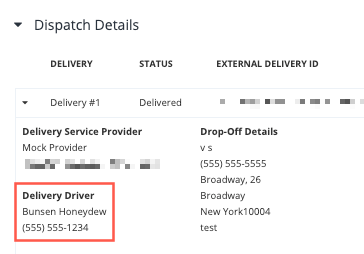
If a delivery is still active and you need to reach the driver, you can do so by locating their details in the Dashboard. Open the order in the dashboard and look for the Dispatch Details section. The phone number shown is not their real phone number, but one that will route to the driver and be active for the duration of the delivery.
Request a new delivery
If the driver or DSP cancels a delivery for any reason, you can request a new delivery through the dashboard. You may also request a new delivery if a portion of the order was left at the restaurant.
Report an issue and/or request a refund
In reviewing the Dispatch Accountability Matrix, if you believe your restaurant is owed a refund, you may request that via the Olo dashboard. The refund request will be sent to the appropriate DSP for review of the situation. Follow these instructions to Report a Dispatch Issue.
You may also use this same function to advise the DSP of any other issue that arose with your order delivery.
Report a driver issue to the DSP
If a DSP’s driver has displayed behavior that you would like to report to that DSP, you can do so by reaching out to the DSP directly. Each DSP has a different mechanism, however, if you have a dashboard with that service, you can most likely reach the DSP there.
Note: Only use this process to report issues with driver behavior. If you are requesting a refund, follow the steps in the Report an issue and/or request a refund section immediately above.